Estimated read time: 2 minutes
Numbering portions are the special creatures that are automatically generated at the start of a paragraph for Arabic numbering or bullets. They are there before the paragraph even starts, and now the track changes rendering for them is better.
This post is meant to show how this looked in the past and what we improved recently.
Motivation
Users expect that if they make a text selection in a Writer document and track changes is on and they delete the content, then that content will be rendered as crossed out. This wasn't exactly like this in Writer if you had a multi-paragraph selection and your paragraphs were a bullet list. Given this selection:

On pressing delete, we rendered the delete redline like this:

Results so far
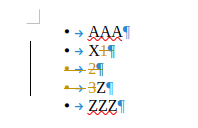
The the issue shows that now we render the delete redline where the old selection was:
How is this implemented?
If you would like to know a bit more about how this works, continue reading... :-)
As usual, the high-level problem was addressed by a series of small changes, first the code change and then adjusting tests to expect the new behavior:
Want to start using this?
You can get a development edition of Collabora Online 26.04 and try it out yourself right now: try the development edition.