Estimated read time: 2 minutes
The document compare view in Collabora Online Writer allows comparing documents side by side, see the first post for more info about the feature in general.
This second post is meant to give you an update on what happened in this area in the last month.
Motivation
Collabora Online core supports showing or hiding tracked changes in document content, we have a UI button for that, see the notebookbar's Review tab, the Tracking section's Show button.
Entering doc compare mode or leaving it works by clicking on the View Changes button, in the same section.
But this means that you can show/hide changes (modifies the document layout, affects everyone) and also view them (only affects your view), and they do quite different things. :-)
Results so far
The new UI has a button with a drop-down: the button is toggle that reflects if you compare change side-by-side or not. And if you click the drop-down next to the button, it's clear that show/hide is for inline rendering in the document layout while the other option is to render changes side-by-side:
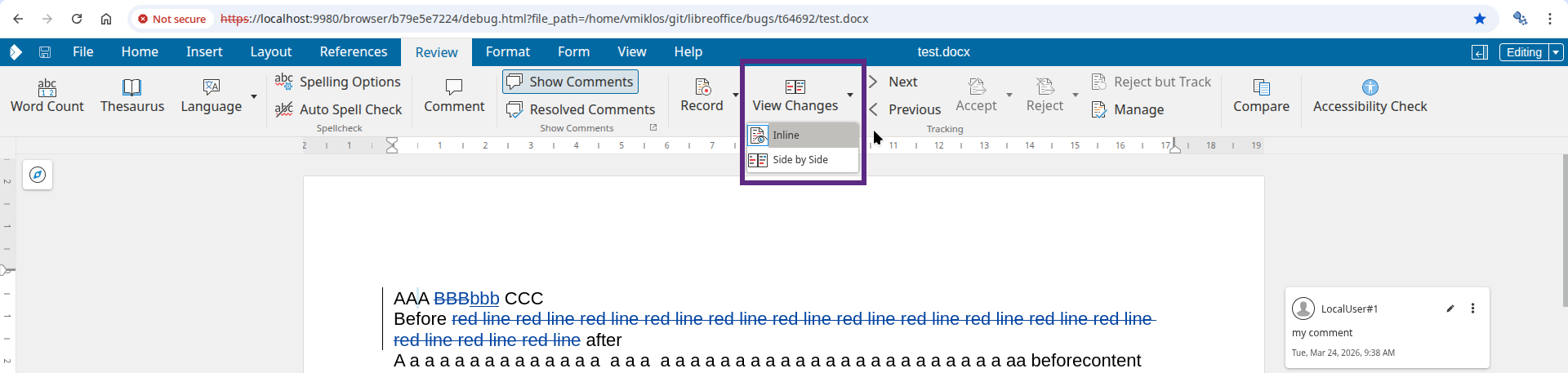
While this used to look like this:

There were also a number of other smaller improvements: now side-by-side rendering works nicely if you use IME to type characters, a missing invalidation is sorted out and side-by-side rendering is better with comments.
How is this implemented?
If you would like to know a bit more about how this works, continue reading... :-)
As usual, the high-level problem was addressed by a series of small changes. Core side:
COOL side:
- browser, document compare: annotate overriding functions with 'override'
- cool#14940 document compare: merge Show and View Changes buttons into a single menu button
- cool#14990 document compare: fix lost mode=2 full invalidations
- cool#15195 document compare: fix bad vertical position of comments on scrolling
- cool#15195 document compare: fix bad horizontal position of comments
Want to start using this?
You can get a development edition of Collabora Online 25.04 and try it out yourself right now: try the development edition.